
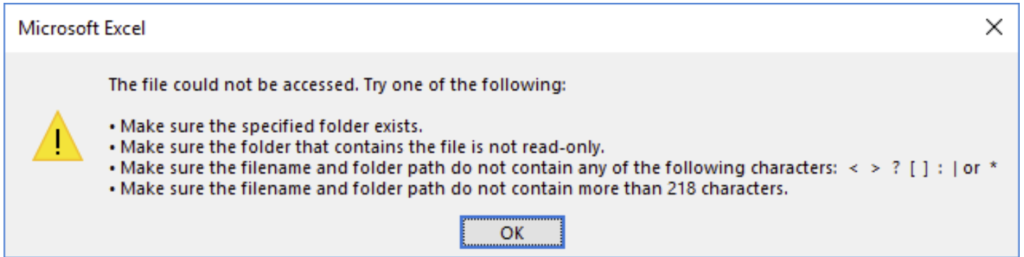
Microsoft Office Excel files stored in deep Folder, sub-folder structures with long names often result in an error when they exceed the maximum file URL length of 218 characters. I wanted to proactively scan the entire SharePoint Online environment for Excel files with long URLs. Though i have found that up to 259 characters it all works fine and have tested it a few times without any issues.
PowerShell to Get All Excel Files that Exceeds Maximum Character Limit
This PowerShell script scans Excel files in all document libraries in a given site collection, Checks if any file URL length is greater than the given limit and export output report to a CSV format.
Import-Module Microsoft.Online.SharePoint.PowerShell -DisableNameChecking
#Function to scan all files with long file names in a site
Function Scan-SPOLongFilePath($SiteURL)
{
Try {
#Setup the context
$Ctx = New-Object Microsoft.SharePoint.Client.ClientContext($SiteURL)
$Ctx.Credentials = New-Object Microsoft.SharePoint.Client.SharePointOnlineCredentials($Cred.UserName,$Cred.Password)

#Get the web from given URL and its subsites
$Web = $Ctx.web
$Ctx.Load($Web)
$Ctx.Load($Web.Lists)
$Ctx.Load($web.Webs)
$Ctx.executeQuery()

#Arry to Skip System Lists and Libraries
$SystemLists = @("Converted Forms", "Master Page Gallery", "Customized Reports", "Form Templates", "List Template Gallery", "Theme Gallery",
"Reporting Templates", "Solution Gallery", "Style Library", "Web Part Gallery","Site Assets", "wfpub", "Site Pages", "Images")

Write-host -f Yellow "Processing Site: $SiteURL"

#Filter Document Libraries to Scan
$Lists = $Web.Lists | Where {$_.BaseType -eq "DocumentLibrary" -and $_.Hidden -eq $false -and $SystemLists -notcontains $_.Title}
#Loop through each document library
Foreach ($List in $Lists)
{
#Get All Files of Given File type from the document library - Excluding Folders
$Query = New-Object Microsoft.SharePoint.Client.CamlQuery
$CAMLQuery = "<View Scope='RecursiveAll'><Query><Where><And><Eq><FieldRef Name='FSObjType' /><Value Type='Integer'>0</Value></Eq><Eq><FieldRef Name='File_x0020_Type' /><Value Type='Text'>$FileExtension</Value></Eq></And></Where></Query></View>"
$Query.ViewXml = $CAMLQuery
$ListItems= $List.GetItems($Query)
$Ctx.Load($ListItems)
$Ctx.ExecuteQuery()

If($ListItems.count -gt 0)
{
Write-host -f Cyan "`t Processing Document Library: '$($List.Title)', Auditing $($ListItems.Count) Item(s)"

$DocumentInventory = @()
#Iterate through each file and get data
Foreach($Item in $ListItems)
{
$File = $Item.File
$Ctx.Load($File)
$Ctx.ExecuteQuery()

#calculate the Absolute encoded URL of the File
If($Web.ServerRelativeUrl -eq "/")
{
$AbsoluteURL= $("{0}{1}" -f $Web.Url, $ListItem.FieldValues["FileRef"])
}
else
{
$AbsoluteURL= $("{0}{1}" -f $Web.Url.Replace($Web.ServerRelativeUrl,''), $Item.FieldValues["FileRef"])
}
$AbsoluteURL = [uri]::EscapeUriString($AbsoluteURL)

If($AbsoluteURL.length -gt $MaxUrlLength)
{
Write-host "`t`tFound a Long File URL at '$AbsoluteURL'" -f Green
#Collect document data
$DocumentData = New-Object PSObject
$DocumentData | Add-Member NoteProperty SiteURL($SiteURL)
$DocumentData | Add-Member NoteProperty DocLibraryName($List.Title)
$DocumentData | Add-Member NoteProperty FileName($File.Name)
$DocumentData | Add-Member NoteProperty FileURL($AbsoluteURL)
$DocumentData | Add-Member NoteProperty CreatedBy($Item["Author"].Email)
$DocumentData | Add-Member NoteProperty CreatedOn($File.TimeCreated)
$DocumentData | Add-Member NoteProperty ModifiedBy($Item["Editor"].Email)
$DocumentData | Add-Member NoteProperty LastModifiedOn($File.TimeLastModified)
$DocumentData | Add-Member NoteProperty Size-KB([math]::Round($File.Length/1KB))

#Add the result to an Array
$DocumentInventory += $DocumentData
}
}
#Export the result to CSV file
$DocumentInventory | Export-CSV $ReportOutput -NoTypeInformation -Append
}
}
#Iterate through all subsites of the current site
ForEach ($Subweb in $Web.Webs)
{
#Call the function recursively
Scan-SPOLongFilePath($Subweb.url)
}
}
Catch {
write-host -f Red "Error Scaning Document Library Inventory!" $_.Exception.Message
}
}

#Set Parameters
$SiteURL= "https://xxxx.sharepoint.com/sites/Marketing"
$ReportOutput="C:\temp\LongFileNames.csv"
$FileExtension = "xlsx"
$MaxUrlLength = 259

#Get Credentials to connect
$Cred = Get-Credential

#Delete the Output Report if exists
If (Test-Path $ReportOutput) { Remove-Item $ReportOutput }

#Call the function
Scan-SPOLongFilePath $SiteURL
For lists and libraries with < 5000 items, this script works absolutely fine. Let’s re-code in in PnP PowerShell.
PnP PowerShell to Audit SharePoint Online Site Collection for Long URLs
This PnP PowerShell script scans the given site collection for long files and folders, and exports its findings to a CSV file.
#Parameters
$SiteURL = "https://Crescent.SharePoint.com/sites/docs"
$MaxUrlLength = 218
$CSVPath = "C:\Temp\LongURLInventory.csv"
$global:LongURLInventory = @()
$Pagesize = 2000

#Get Credentials to connect
#$Credential = Get-Credential

#Function to scan and collect long files
Function Get-PnPLongURLInventory
{
    [cmdletbinding()]
    param([parameter(Mandatory = $true, ValueFromPipeline = $true)] $Web)

    Write-host "Scanning Files with Long URL in Site '$($Web.URL)'" -f Yellow
    If($Web.ServerRelativeUrl -eq "/")
    {
        $TenantURL= $Web.Url
    }
    Else
    {
        $TenantURL= $Web.Url.Replace($Web.ServerRelativeUrl,'')
    }

    #Get All Large Lists from the Web - Exclude Hidden and certain lists
    $ExcludedLists = @("Form Templates", "Preservation Hold Library","Site Assets", "Pages", "Site Pages", "Images",
                            "Site Collection Documents", "Site Collection Images","Style Library")

    #Get All Document Libraries from the Web
    Get-PnPList -Web $Web -PipelineVariable List | Where-Object {$_.BaseType -eq "DocumentLibrary" -and $_.Hidden -eq $false -and $_.Title -notin $ExcludedLists -and $_.ItemCount -gt 0} | ForEach-Object {
        #Get Items from List
        $global:counter = 0;
        $ListItems = Get-PnPListItem -List $_ -Web $web -PageSize $Pagesize -Fields Author, Created, File_x0020_Type -ScriptBlock { Param($items) $global:counter += $items.Count; Write-Progress -PercentComplete ($global:Counter / ($_.ItemCount) * 100) -Activity "Getting List Items of '$($_.Title)'" -Status "Processing Items $global:Counter to $($_.ItemCount)";}
        $LongListItems = $ListItems | Where { ([uri]::EscapeUriString($_.FieldValues.FileRef).Length + $TenantURL.Length ) -gt $MaxUrlLength }
        Write-Progress -Activity "Completed Retrieving Items from List $($List.Title)" -Completed

        If($LongListItems.count -gt 0)
        {
            #Get Root folder of the List
            $Folder = Get-PnPProperty -ClientObject $_ -Property RootFolder
            Write-host "`tFound '$($LongListItems.count)' Items with Long URLs at '$($Folder.ServerRelativeURL)'" -f Green

            #Iterate through each long url item and collect data
            ForEach($ListItem in $LongListItems)
            {
                #Calculate Encoded Full URL of the File
                $AbsoluteURL =  "$TenantURL$($ListItem.FieldValues.FileRef)"
                $EncodedURL = [uri]::EscapeUriString($AbsoluteURL)

                    #Collect document data
                    $global:LongURLInventory += New-Object PSObject -Property ([ordered]@{
                        SiteName  = $Web.Title
                        SiteURL  = $Web.URL
                        LibraryName = $List.Title
                        LibraryURL = $Folder.ServerRelativeURL
                        ItemName = $ListItem.FieldValues.FileLeafRef
                        Type = $ListItem.FileSystemObjectType
                        FileType = $ListItem.FieldValues.File_x0020_Type
                        AbsoluteURL = $AbsoluteURL
                        EncodedURL = $EncodedURL
                        UrlLength = $EncodedURL.Length
                        CreatedBy = $ListItem.FieldValues.Author.LookupValue
                        CreatedByEmail  = $ListItem.FieldValues.Author.Email
                        CreatedAt = $ListItem.FieldValues.Created
                        ModifiedBy = $ListItem.FieldValues.Editor.LookupValue
                        ModifiedByEmail = $ListItem.FieldValues.Editor.Email
                        ModifiedAt = $ListItem.FieldValues.Modified
                    })
                }
            }
        }
}

#Connect to Site collection
Connect-PnPOnline -Url $SiteURL -UseWebLogin

#Call the Function for Web & all Subwebs
Get-PnPWeb | Get-PnPLongURLInventory
Get-PnPSubWebs -Recurse| ForEach-Object { Get-PnPLongURLInventory $_ }
Disconnect-PnPOnline

#Export Documents Inventory to CSV
$Global:LongURLInventory | Export-Csv $CSVPath -NoTypeInformation
Write-host "Report has been Exported to '$CSVPath'"  -f Magenta
Let’s scan all files across all site collections in the entire tenant for all files with long file URLs.
#Parameters
$Domain =  "crescent" #Domain Name in SharePoint Online. E.g. https://Crescent.SharePoint.com
$MaxUrlLength = 218
$CSVFile = "C:\Temp\LongURLInventory.csv"
$Pagesize = 2000

#Frame Tenant URL and Tenant Admin URL
$TenantURL = "https://$Domain.SharePoint.com"
$TenantAdminURL = "https://$Domain-Admin.SharePoint.com"

#Function to scan and collect long files
Function Get-PnPLongURLInventory
{
    [cmdletbinding()]
    param([parameter(Mandatory = $true, ValueFromPipeline = $true)] $Web)

    Write-host "Scanning Files with Long URL in Site '$($Web.URL)'" -f Yellow

    #Get All Large Lists from the Web - Exclude Hidden and certain lists
    $ExcludedLists = @("Form Templates", "Preservation Hold Library","Site Assets", "Pages", "Site Pages", "Images",
                            "Site Collection Documents", "Site Collection Images","Style Library")

    #Get All Document Libraries from the Web
    Get-PnPList -Web $Web -Connection $SiteConn | Where-Object {$_.BaseType -eq "DocumentLibrary" -and $_.Hidden -eq $false -and $_.Title -notin $ExcludedLists -and $_.ItemCount -gt 0} | ForEach-Object {
        #Get Items from List
        $global:counter = 0;
        $LongURLInventory = @()
        $ListItems = Get-PnPListItem -List $_ -Web $web -Connection $SiteConn -PageSize $Pagesize -Fields Author, Created, File_x0020_Type -ScriptBlock { Param($items) $global:counter += $items.Count; Write-Progress -PercentComplete ($global:Counter / ($_.ItemCount) * 100) -Activity "Getting List Items of '$($_.Title)'" -Status "Processing Items $global:Counter to $($_.ItemCount)";}
        $LongListItems = $ListItems | Where { ([uri]::EscapeUriString($_.FieldValues.FileRef).Length + $TenantURL.Length ) -gt $MaxUrlLength }
        If($LongListItems.count -gt 0)
        {
            #Get Root folder of the List
            $Folder = Get-PnPProperty -ClientObject $_ -Property RootFolder
            Write-host "`tFound '$($LongListItems.count)' Item(s) with Long URLs at '$($Folder.ServerRelativeURL)'" -f Green

            #Iterate through each long url item and collect data
            ForEach($ListItem in $LongListItems)
            {
                #Calculate Encoded Full URL of the File
                $AbsoluteURL =  "$TenantURL$($ListItem.FieldValues.FileRef)"
                $EncodedURL = [uri]::EscapeUriString($AbsoluteURL)

                    #Collect document data
                    $LongURLInventory += New-Object PSObject -Property ([ordered]@{
                        SiteName  = $Web.Title
                        SiteURL  = $Web.URL
                        LibraryName = $List.Title
                        LibraryURL = $Folder.ServerRelativeURL
                        ItemName = $ListItem.FieldValues.FileLeafRef
                        Type = $ListItem.FileSystemObjectType
                        FileType = $ListItem.FieldValues.File_x0020_Type
                        AbsoluteURL = $AbsoluteURL
                        EncodedURL = $EncodedURL
                        UrlLength = $EncodedURL.Length
                        CreatedBy = $ListItem.FieldValues.Author.LookupValue
                        CreatedByEmail  = $ListItem.FieldValues.Author.Email
                        CreatedAt = $ListItem.FieldValues.Created
                        ModifiedBy = $ListItem.FieldValues.Editor.LookupValue
                        ModifiedByEmail = $ListItem.FieldValues.Editor.Email
                        ModifiedAt = $ListItem.FieldValues.Modified
                    })
                }
                #Export Documents Inventory to CSV
                $LongURLInventory | Export-Csv $CSVFile -NoTypeInformation -Append
            }
            Write-Progress -Activity "Completed Exporting Long URL Items from List $($_.Title)" -Completed
        }
}

#Connect to Admin Center
Connect-PnPOnline -Url $TenantAdminURL -UseWebLogin

#Delete the Output report file if exists
If (Test-Path $CSVFile) { Remove-Item $CSVFile }

#Get All Site collections - Filter BOT and MySite Host
$Sites = Get-PnPTenantSite -Filter "Url -like '$TenantURL'"

#Iterate through all site collections
$Sites | ForEach-Object {
    #Connect to each site collection
    $SiteConn = Connect-PnPOnline -Url $_.URL -UseWebLogin -ReturnConnection

    #Call the Function for Web & all Subwebs
    Get-PnPWeb -Connection $SiteConn | Get-PnPLongURLInventory
    Get-PnPSubWebs -Recurse -Connection $SiteConn | ForEach-Object { Get-PnPLongURLInventory $_ }

    Disconnect-PnPOnline -Connection $SiteConn
}